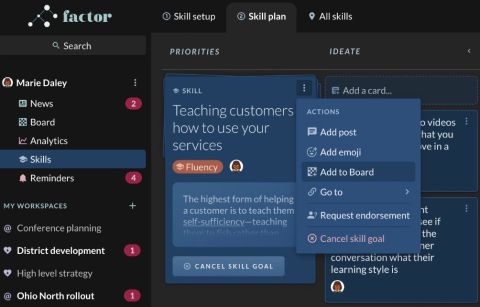
Just like strategy and habits, skills are a key lever for performance. To help keep skill development top of mind, you should add your highest priority skill(s) to your personal board, as well as any workspaces where the skill is most relevant. To do so:
- Click on the 3-dot menu in the upper right of the skill you would like to add.
- Click “Add to board”. The skill will now appear on your personal board along with any stacks you have created there or mirrored there from other workspaces.

- Now that the skill is on your personal board, you can add it to other workspaces. To do so, click the three-dot menu again and click “Add to a Board”. Use the search dropdown to pick the workspace where you’d like the skill to appear. It will show up just like any other stack.

Why would I want to add a skill to a workspace board?
Adding a skill to a workspace board allows you visibility to see a workspace’s strategy, prioritized habits and skill goals all in one place to accelerate learning and collaboration. Some people also like creating a separate workspace for themselves where they can add their personal skill goals to. How do I add a skill to a board?