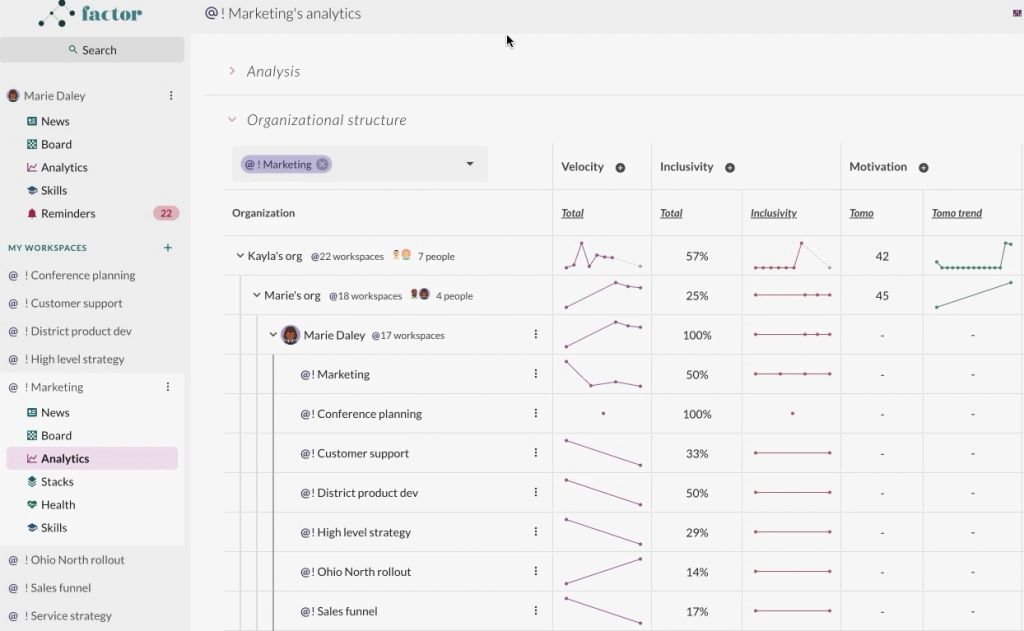
In Analytics, you can view metrics for yourself or any reporting line, team, or individual in the organization.

To access Analytics for one of your teams or reporting lines, click on that team (i.e., that workspace) or reporting line in the left side panel, then click "Analytics".

The Factor left side panel with its "MY WORKSPACES" list fully in view — "! Conference planning", "! Customer support", "! District product dev", "! High level strategy", "! Marketing", "! Ohio North rollout", "! Sales funnel", "! Service strategy", then "Customer support 1", "District development", "Global Ops OKRs", "Ops materials", "Product strategy" — each prefixed with an @ and each of them the first click this step asks for. The panel's upper block, under the account name "Marie Daley", holds the personal apps (News highlighted, then Board, Analytics, Skills, Reminders badged 22); the workspace names sit below that, in a separate alphabetized list, which is what makes team analytics a different route from personal analytics.